Active Claude: When AI Works While You Sleep
What if Claude could proactively work through your backlog while you focus on other things? ~3 weeks of building, a lot of Claude SDK exploration, and one dashboard later.
🏗️ View the Architecture Diagrams → — Interactive visual deep-dive into the system.
What if Claude could work on your tasks autonomously?
Not just answering questions or helping you code. Actually claiming tasks, spinning up isolated workspaces, writing code, reviewing its own work, and creating PRs - all while you’re in meetings or sleeping.
That’s what I built. I call it Active Claude.
The Problem That Sparked This
At work, we constantly juggle incoming work from everywhere: Jira tickets, meeting action items, Google Docs with feature specs, Confluence pages with technical requirements. Manually triaging this information and translating it into actual code changes is exhausting.
One day I thought: Claude is already good at writing code. What if I gave it a queue of tasks and let it work through them in parallel?
The key insight was that most coding tasks follow a predictable pattern:
- Understand the codebase
- Make changes
- Verify the changes work
- Create a PR
What if I could automate that entire loop?
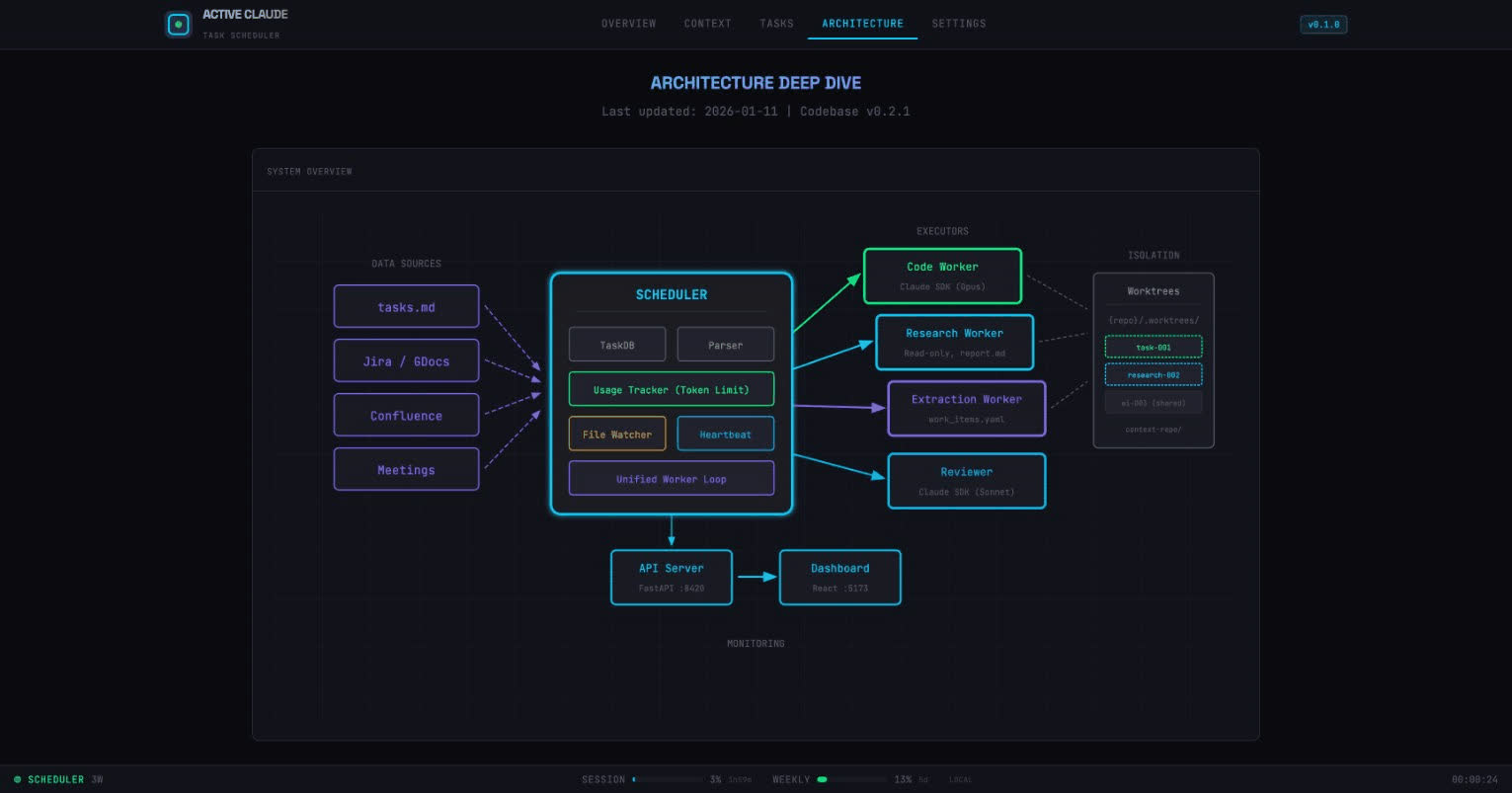
The Architecture (TL;DR)
Here’s what Active Claude does:
┌─────────────┐     ┌─────────────┐     ┌─────────────┐
│ Data Sources│ ──▶ │  Scheduler  │ ──▶ │   Workers   │
│ (Jira, Docs)│     │  (Python)   │     │ (Claude SDK)│
└─────────────┘     └─────────────┘     └─────────────┘
                           │                    │
                           ▼                    ▼
                    ┌─────────────┐     ┌─────────────┐
                    │  Reviewer   │ ◀── │  Worktrees  │
                    │  (Sonnet)   │     │ (Isolation) │
                    └─────────────┘     └─────────────┘
The key components:
- Scheduler: Orchestrates everything, manages the task queue
- Workers: Run Claude SDK (Opus) to execute tasks in parallel
- Reviewer: A separate Claude instance (Sonnet) that validates completed work
- Worktrees: Git worktrees for complete isolation between concurrent tasks
The Breakthrough: Git Worktrees
The first problem I hit was isolation. If you have 3 workers all modifying the same repo simultaneously, you get merge conflicts and chaos.
The solution: Git worktrees.
# Each task gets its own isolated copy
{repo}/.worktrees/
├── task-001/      # Worker 1 working here
├── task-002/      # Worker 2 working here
└── research-003/  # Worker 3 doing research
Worktrees share the .git directory (no need to clone), but each has its own working directory and branch. A crash in one task doesn’t affect others.
This was the “aha moment” that made the whole system possible.
Task Types: Not Everything Needs Code
Early on I realized not every task is ready for implementation. Some need research first.
So I built three task types:
| Type | Model | What It Does | Output |
|---|---|---|---|
| CODE | Opus | Full read/write, implements features | PR-ready code |
| RESEARCH | Opus | Read-only, investigates codebase | report.md with findings |
| EXTRACTION | Sonnet | Parses Jira/Docs/Confluence | work_items.yaml |
The “research first” approach dramatically improved success rates. Before implementing a complex feature, I have Claude investigate the codebase structure, understand existing patterns, and document its findings. Then the coding task has that context available.
The Extraction Pipeline
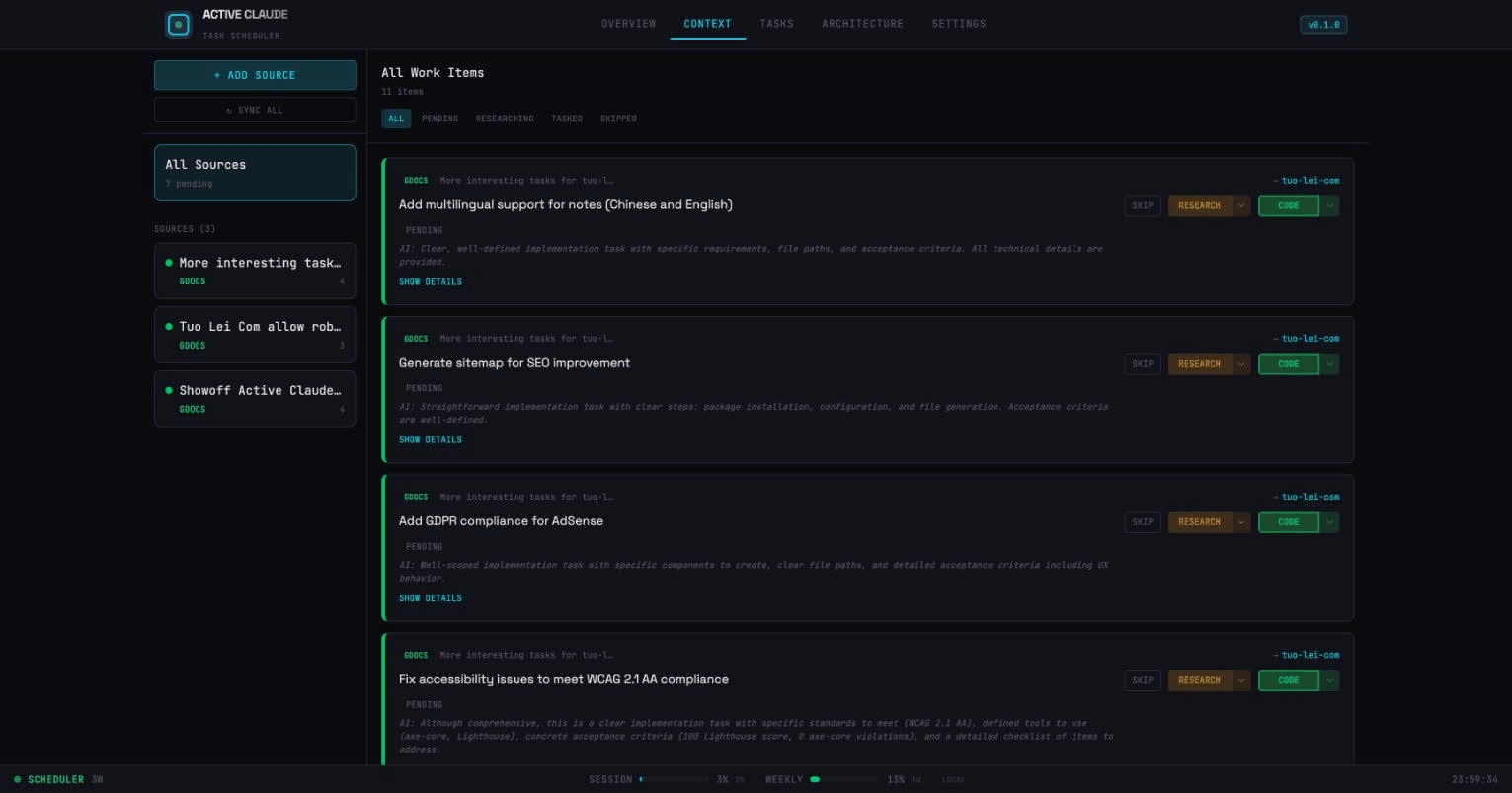
This is where it gets interesting. Instead of manually creating tasks, I wanted to pull work automatically from our tools:
Jira ──┐
       │    ┌────────────┐    ┌─────────────┐    ┌────────────┐
Docs ──┼──▶ │ Extraction │ ─▶ │ User Review │ ─▶ │ Work Items │
       │    │   (AI)     │    │  (approve)  │    │ (actionable)│
Conf ──┘    └────────────┘    └─────────────┘    └────────────┘
Here’s how it works:
- Add a data source: Connect Jira, Google Docs, or Confluence
- AI extraction: Claude parses the content and identifies potential work items
- Human review: I review and approve/modify the extracted items (this is key!)
- Triage: Each item gets categorized as SKIP, RESEARCH, or TASK
The human-in-the-loop step is crucial. Not everything in a Jira ticket should become a task. Some items are too vague, some need discussion first, some are just references.
Task Lifecycle
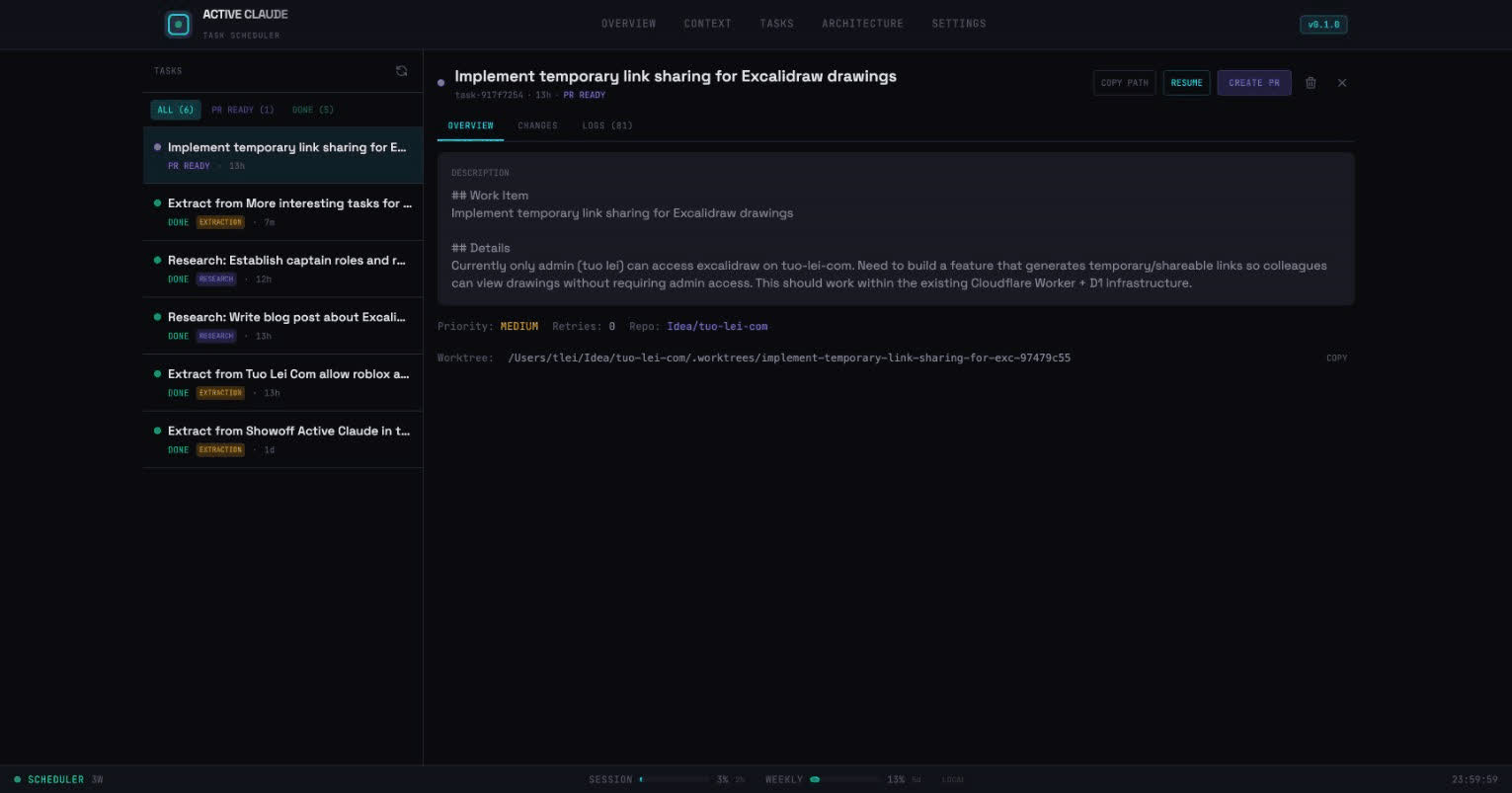
Every task flows through a predictable state machine:
PROPOSED ──▶ PENDING ──▶ RUNNING ──▶ REVIEWING ──▶ PR_READY ──▶ DONE
                ▲                         │
                └─── RETRY (max 3x) ──────┘
                             │
                             ▼
                          FAILED
The retry mechanism is where the magic happens. When the reviewer rejects a task, it captures feedback:
if task.rejection_reason and task.retry_count > 0:
    prompt_parts.extend([
        "## Previous Attempt Feedback",
        f"Rejection reason: {task.rejection_reason}",
        "Please address the feedback above and complete the task.",
    ])
Claude learns from its mistakes. It often succeeds on retry by addressing specific issues from the reviewer.
Rate Limiting (The Hard Way)
With multiple workers running Claude agents, I hit API rate limits fast.
I built a two-tier rate limiting system:
1. Proactive (Token-Based)
I read Claude Code session files to calculate actual token usage:
can_start, stats = can_start_task()
if not can_start:
    logger.warning(f"Usage too high: {stats.usage_percent:.1f}%")
    return False
Default: pause at 80% of 2.5M tokens per 5-hour window.
2. Reactive (Error-Based)
When we actually hit limits:
_rate_limited = True
_rate_limit_until = datetime.now() + timedelta(minutes=5)
logger.warning(f"Rate limited! Backing off until {_rate_limit_until}")
This double-protection keeps the system running smoothly without burning through API limits.
The Dashboard: Mission Control
I built a React dashboard for real-time visibility:
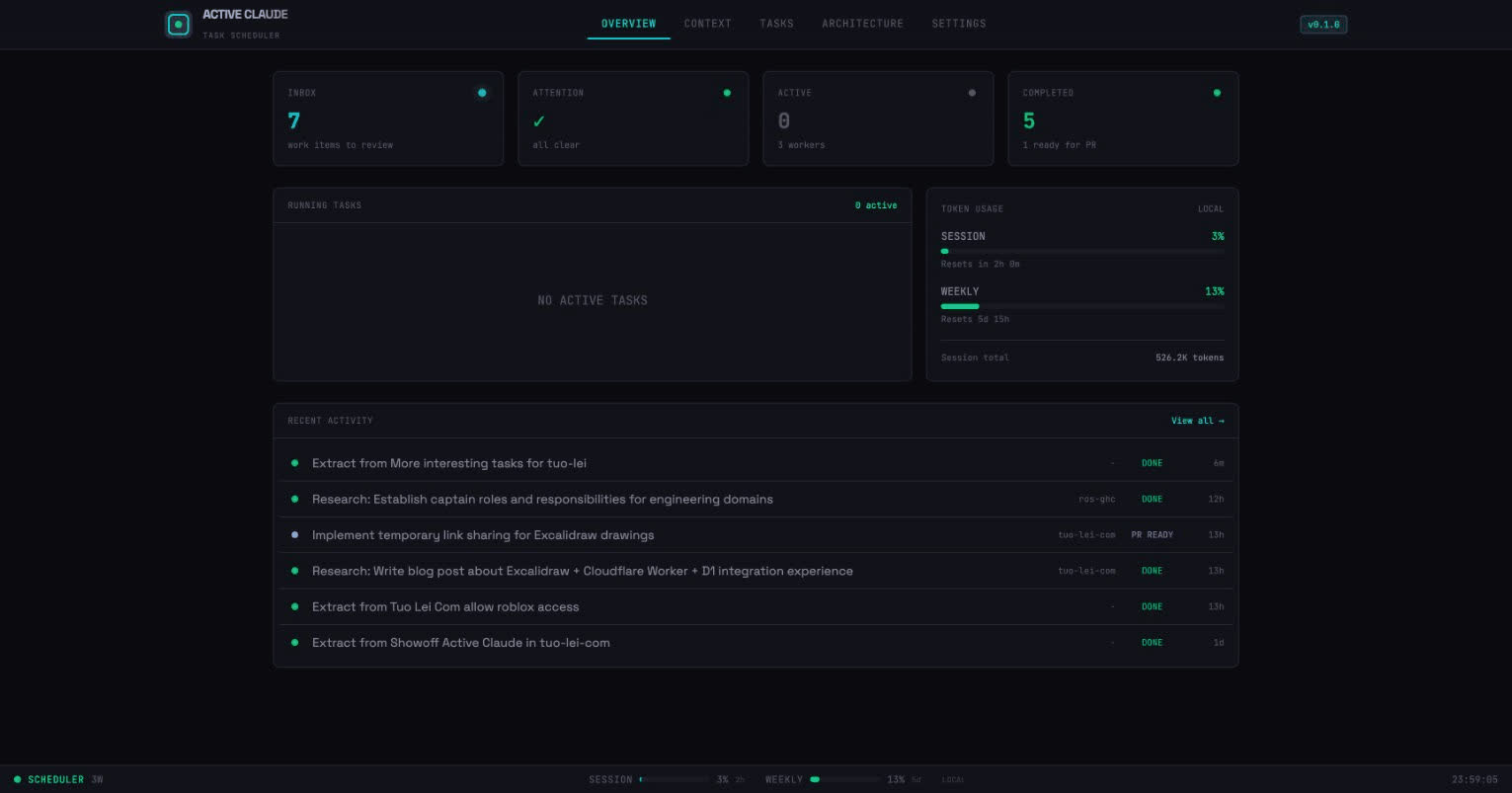
Key features:
- Real-time WebSocket updates: Events stream as tasks execute
- Token usage visualization: See session and weekly limits
- Task detail view: Full event log with tool uses
- Work item triage: Review and categorize extracted items
- Live feed: Watch Claude’s actions in real-time
The “Mission Control” aesthetic was deliberate. It feels like operating a system, not just browsing a dashboard.
The Tech Stack
| Layer | Technology | Why |
|---|---|---|
| Scheduler | Python + asyncio | Claude SDK is Python-native |
| Workers | Claude Agent SDK | First-class tool support |
| API | FastAPI | Async, great with aiosqlite |
| Dashboard | React + TypeScript | TanStack Query for state |
| Storage | SQLite + Drizzle | Simple, no external deps |
| Isolation | Git worktrees | Native, no containers needed |
The philosophy was: keep it simple. SQLite instead of Postgres. Git worktrees instead of Docker. Native tools when possible.
What I Learned
1. Research-First Dramatically Improves Success
Having Claude investigate before implementing makes a huge difference. The report.md provides crucial context that the coding task can reference.
2. Feedback Loops Are More Effective Than Perfect Prompts
I spent too long trying to craft the “perfect” prompt. The retry mechanism with rejection feedback works better. Let Claude iterate.
3. Observability Is Non-Negotiable
Real-time WebSocket updates and detailed event logging make debugging possible. You can see exactly what Claude is doing at any moment.
4. Human-in-the-Loop At The Right Place
Full automation sounds great, but the triage step (SKIP/RESEARCH/TASK) is where humans add the most value. We’re good at judgment calls. Claude is good at execution.
5. Rate Limiting Needs Multiple Layers
Proactive token tracking alone isn’t enough. You also need reactive backoff when you actually hit limits. Belt and suspenders.
The Numbers
Here’s roughly what it cost to build this:
| Metric | Value |
|---|---|
| Development time | ~3 weeks |
| Lines of Python | ~3,000 |
| Lines of TypeScript | ~2,500 |
| React components | 13+ |
| API endpoints | 15+ |
| Task types | 3 (CODE, RESEARCH, EXTRACTION) |
| Default workers | 3 parallel |
| Token limit | 2.5M per 5h window |
What’s Next
I’m exploring several directions:
- Multi-repo tasks: Coordinating changes across multiple repositories
- Learning from patterns: Using successful completions to improve prompts
- Team collaboration: Multiple users reviewing and triaging work items
- Custom prompts: User-editable system prompts for workers and reviewers
The Philosophy
Active Claude isn’t about replacing developers. It’s about changing the nature of the work.
Instead of:
- Read Jira ticket
- Understand codebase
- Write code
- Create PR
- Address review comments
- Repeat
It becomes:
- Review AI-proposed work items
- Triage: SKIP, RESEARCH, or TASK
- Review completed PRs
- Merge or provide feedback
You move from executor to reviewer. From writing code to directing AI and ensuring quality.
Is this the future of software development? I don’t know. But it’s a fascinating experiment.
Built with Claude Agent SDK over ~3 weeks in January 2026. Architecture inspired by distributed systems patterns. Dashboard aesthetic: Mission Control.