Vibe Coding a 22-Year-Old VB6 Game Back to Life
What happens when you find a game you made as a teenager and try to run it in a browser? ~80 prompts, 14 hours, and one binary hex-edit later.
🎮 Play it in your browser → — A game I made in 2002, now running via WebAssembly.
In the summer of 2002, I had just graduated from middle school in China.
With three months of freedom ahead and a burning curiosity about programming, I taught myself Visual Basic 6 and created 电子宠物 (Electronic Pet) - a virtual pet simulation game featuring a penguin named Penning.
The feature list was… extensive:
- A fully functional stock market with 10 stocks and ~500 days of historical data
- 9 different career paths your pet could grow into
- Day/night cycles, hunger, happiness, and health systems
- Shops, jobs, housing upgrades, and 36 different penguin animations
I borrowed sprite assets from other games and anime, and… life moved on. The game sat on backup drives for 22 years. The source code was long gone - only the compiled .exe survived.
Fast forward to late 2025. I found penguin.exe on an old hard drive. Nostalgia hit hard.
Sure, I could spin up a Windows VM and run it there. But where’s the fun in that?
I wanted to share it with friends. Put it on the web. Make it playable in a browser with zero setup.
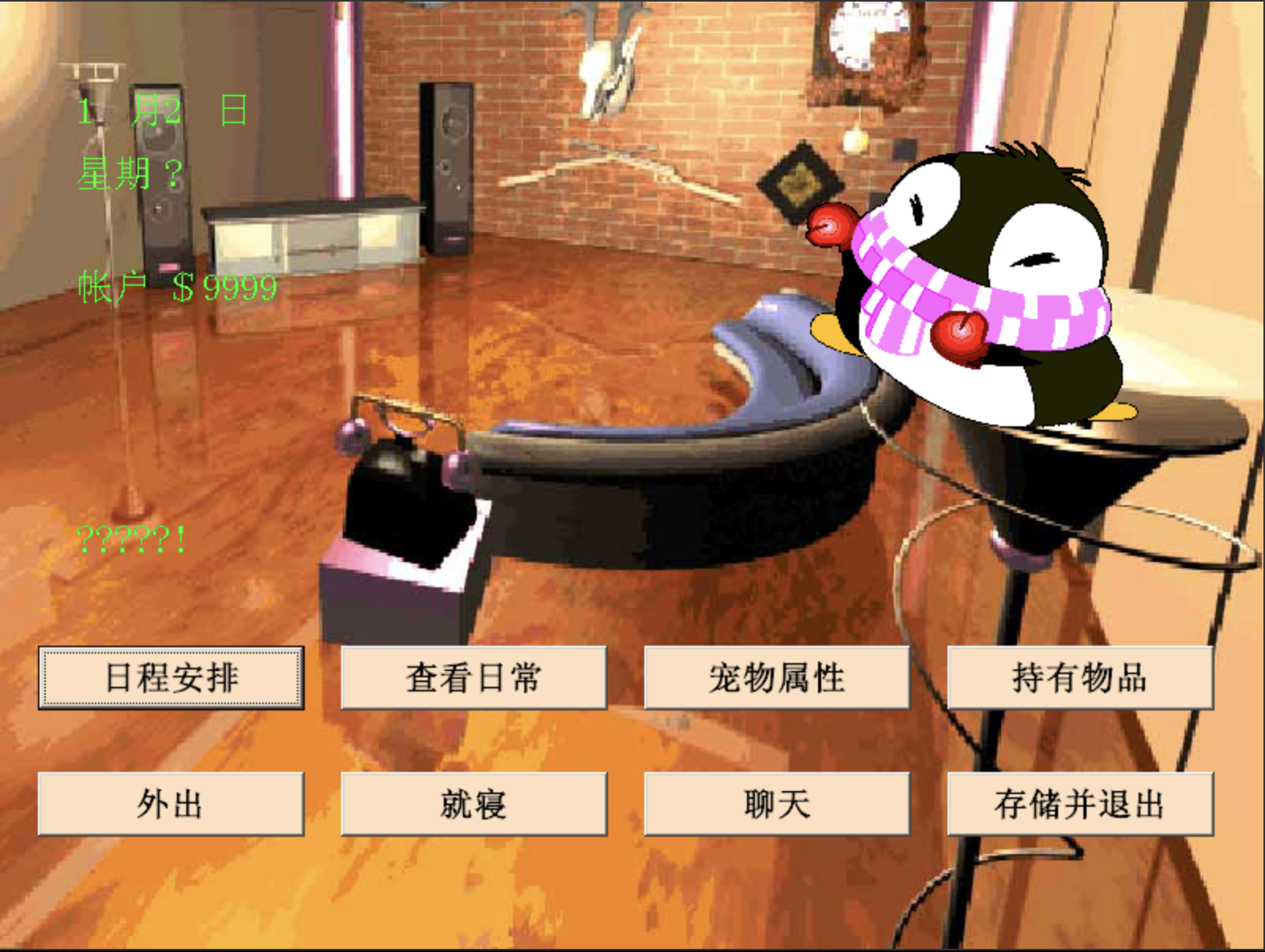
The Goal: Run It in a Browser
Why a browser? Because it’s 2025. Because I wanted to share it with friends. Because the web is the most universal platform we have.
I fired up Claude Code one evening with a simple prompt:
“Hi, I made a computer game using Visual Basic during my childhood. Can you help me run it in a browser?”
14 hours and ~80 prompts later, the game was running in Chrome. Along the way, the context window filled up multiple times, Claude automatically resumed, and we descended into a rabbit hole of x86 emulation, Wine internals, and binary hex editing.
You can play the game right now.
Here’s how it went down.
The Graveyard of Failed Approaches
Attempt #1: v86 + Windows 98
v86 is a JavaScript x86 emulator. The idea was elegant: boot Windows 98 in the browser, run the game.
Reality: painfully slow. The game took 30 seconds to respond to a single click. And the Chinese text? Garbled beyond recognition.
Verdict: Dead on arrival.
Attempt #2: Native Wine
Wine ran the game perfectly on my Mac! Chinese text, animations, sounds - all working.
But Wine isn’t portable. I couldn’t just ship my Wine installation to everyone.
Verdict: Proof of concept, not a solution.
Attempt #3: BoxedWine
Then Claude found BoxedWine - Wine compiled to WebAssembly. A full Windows compatibility layer running in the browser.
The game window opened. Progress!
But instead of Chinese characters, I saw: □□□□
Verdict: We’re onto something.
The Font Battle
The fix seemed obvious - add Chinese fonts. We created a Wine overlay with SimSun.ttf and the GBK codepage file:
wine-cn-test.zip
├── home/username/.wine/
│   ├── drive_c/windows/Fonts/SimSun.ttf
│   └── drive_c/windows/system32/c_936.nls
└── lib/wine/*.dll.so
Chinese text appeared! The main menu was beautiful.
And then I clicked “Load Game” (旧的回忆).
Runtime Error 52: Bad file name or numberThe nightmare began.
Error 52 Hell
Error 52 in VB6 means “I tried to open a file and failed.” Simple, right?
But the file existed. I could see it right there: d:\电子宠物\data\status
So why couldn’t the game find it?
Claude and I dove into the BoxedWine source code. After hours of tracing through Wine emulation layers, we found the culprit:
// BoxedWine's bstring.cpp - THE BUG
std::wstring BString::w_str() {
    std::string s(data->str);
    std::wstring ws(s.begin(), s.end());  // byte-by-byte conversion!
    return ws;
}
This code takes a UTF-8 string and converts it to a wide string by treating each byte as a separate character.
That’s catastrophically wrong for Chinese text.
When 电子宠物 (4 Chinese characters, 12 UTF-8 bytes) goes through this function:
- Input:
电子宠物(4 meaningful characters) - Output: 12 garbage wide characters
The file path gets corrupted. The file isn’t found. Error 52.
We tried everything to work around this:
- Symlinks? BoxedWine didn’t follow them correctly.
- UTF-8 flags in the ZIP? BString still corrupted the strings.
- Locale settings? Didn’t affect BString behavior.
We were stuck.
”What If We Just… Patch the Binary?”
This is where vibe coding gets interesting.
Claude suggested something crazy: instead of fixing BoxedWine (which would require rebuilding the whole emulator), what if we patched the game binary itself?
“Wait,” I said. “You mean hex-edit a 22-year-old executable?”
“Exactly. Replace all the Chinese paths with ASCII paths. If there’s no Chinese, there’s nothing to corrupt.”
I loved it.
The Discovery: 87 Hardcoded Paths
We opened the binary in a hex editor and searched for UTF-16LE encoded Chinese strings.
The result was… a lot:
| Pattern | Count |
|---|---|
d:\电子宠物\ (lowercase) | 47 |
D:\电子宠物\ (uppercase) | 40 |
87 hardcoded absolute paths. 2002-me apparently believed the game would always live on the D: drive.
The Constraint: Exact Byte Length
Here’s the beautiful problem with binary patching: you can’t change the length of anything.
VB6 stores strings with length prefixes. If I changed d:\电子宠物\ to something shorter, the length prefix would be wrong, and the entire binary would become corrupted.
The replacement had to be exactly the same number of bytes.
Let’s do the math:
d:\电子宠物\  (UTF-16LE)
├── d      → 2 bytes (0x64 0x00)
├── :      → 2 bytes (0x3A 0x00)
├── \      → 2 bytes (0x5C 0x00)
├── 电     → 2 bytes (0x35 0x75)
├── 子     → 2 bytes (0x50 0x5B)
├── 宠     → 2 bytes (0x20 0x5B)
├── 物     → 2 bytes (0x69 0x72)
└── \      → 2 bytes (0x5C 0x00)
Total: 16 bytes
What ASCII string is exactly 16 bytes in UTF-16LE? We need 8 ASCII characters.
Claude’s solution was elegant: .\.\.\.\
.\.\.\.\  (UTF-16LE)
├── .  → 2 bytes
├── \  → 2 bytes
├── .  → 2 bytes
├── \  → 2 bytes
├── .  → 2 bytes
├── \  → 2 bytes
├── .  → 2 bytes
└── \  → 2 bytes
Total: 16 bytes ✓
It looks weird, but it works! In Windows path resolution, . means “current directory”, so .\.\.\.\data\ just becomes .\data\ - a relative path.
More Patches: Chinese Directory Names
The game also had Chinese subdirectory names that needed fixing:
image\地点\  →  image\pl\    (places)
image\按钮\  →  image\bt\    (buttons)
And Chinese filenames for career ending images:
农民.jpg    →  e1.jpg   (Farmer)
武术家.jpg  →  e2.jpg   (Martial Artist)
旅行家.jpg  →  e3.jpg   (Traveler)
厨师.jpg    →  e4.jpg   (Chef)
医生.jpg    →  e5.jpg   (Doctor)
... (9 careers total)
Each replacement carefully matched to the exact byte length of the original.
The Moment of Truth
After patching all 87 paths, renaming the actual directories and files to match, and rebuilding the ZIP…
I clicked “Load Game.”
No error.
My save file from 2002? Loaded. My penguin? Still there. Stock portfolio intact.
It worked.
The Tooltip Problem
Victory was short-lived. When I hovered over shop items, the tooltips showed:
ǐ'ɿ'>!ÓDȘËUˇǑµÆ£DëÔªǨ8!That was supposed to be 番茄,很不错的菜哦! (Tomato, a really nice vegetable!)
Same BString bug, different location. VB6 stores tooltip text as GBK-encoded strings in the P-code resources.
By now, we knew the solution: more binary patching. But this time, we had to translate.
Translating 43 Tooltips with Byte Constraints
The challenge: replace each Chinese tooltip with English text of exactly the same byte length.
This turned translation into a puzzle game:
番茄,很不错的菜哦! (20 bytes GBK)
→ Tomato, very good!  (18 chars + 2 spaces = 20 bytes) ✓

蜂蜜,既好吃又是补品 (20 bytes GBK)
→ Honey, tasty & tonic (20 bytes) ✓

鱼,上好的食品 (14 bytes GBK)
→ Fish, quality! (14 bytes) ✓
Some translations required creativity:
裙子穿上特漂亮哦 (16 bytes)
→ Dress looks nice (16 bytes) ✓

这个颜色的帽子呢 (16 bytes)
→ A colorful hat!! (16 bytes) ✓
We patched all 43 tooltips:
- 12 food items (tomato, honey, fish, meat, egg, bread, milk, yogurt, cake, cookie, candy, juice)
- 5 clothing items (dress, hat, shoes, coat, underwear)
- 10 accessories and treasures
- 16 shop UI elements
Result: Tooltips now display readable English!
What I Learned
1. Binary Patching Is a Superpower
When you can’t fix the system, fix the data. This mindset shift - from “we need to rebuild the emulator” to “we just need to avoid the bug” - saved the entire project.
2. Byte Length Constraints Create Interesting Puzzles
The requirement to maintain exact byte lengths turned mundane translation into creative problem-solving. It’s not “how do I translate this?” but “how do I translate this in exactly 16 bytes?“
3. Old Software Is Fragile but Resilient
My 2002 code had hardcoded paths, assumed a specific drive letter, and stored everything as Chinese strings. It was absolutely not designed for portability.
And yet, with 87 surgical patches, it runs perfectly in a 2025 web browser.
4. Vibe Coding Is Real
This project would have been impossible alone. I didn’t know BoxedWine’s internals. I didn’t remember VB6’s string storage format. I had no idea how to approach binary patching.
The conversation went something like:
- Me: “It’s an encoding problem right? GBK or GB2312 or something?”
- Claude: dives into BoxedWine source code
- Claude: “Found it. BString::w_str() does byte-by-byte conversion. That’s the bug.”
- Me: “Don’t wait, try to find a fix or patch existing files”
- Claude: tries symlinks, UTF-8 flags, locale settings
- Claude: “None of those worked. But… what if we patch the binary itself?”
- Me: “You mean hex-edit a 22-year-old executable?”
- Claude: “Exactly.”
Neither of us had the complete solution at the start. I brought the nostalgia and direction; Claude brought the technical deep-dives and implementation. The context filled up and resumed 5+ times. We figured it out together.
The Final Result
My childhood game now runs in any modern web browser:
- Chinese text displays correctly
- Save/Load works (Error 52: defeated)
- Tooltips show English translations
- Stock market, careers, all 36 animations - everything works
You can pet a virtual penguin that I coded in 2002, rendered through Wine compiled to WebAssembly, with binary patches applied to work around UTF-8 encoding bugs.
The future is weird and wonderful.
Technical Summary
| Challenge | Solution |
|---|---|
| Game won’t run on modern systems | BoxedWine (Wine → WebAssembly) |
| Chinese characters show as boxes | SimSun.ttf + c_936.nls codepage |
| Error 52 on file access | Binary patch: 87 Chinese paths → ASCII |
| Garbled tooltips | Binary patch: 43 GBK strings → English |
Key Files Patched
| Original Path | Patched Path | Purpose |
|---|---|---|
d:\电子宠物\ | .\.\.\.\ | Root game directory (87 occurrences) |
\地点\ | \pl\ | Location backgrounds |
\按钮\ | \bt\ | UI buttons |
农民.jpg | e1.jpg | Career ending images (9 files) |
The BString Bug
// BoxedWine's broken code:
std::wstring ws(s.begin(), s.end());  // treats each byte as a char

// What it should do:
std::wstring ws = utf8_to_utf16(s);   // proper multi-byte handling
This single line caused all our encoding problems. Rather than rebuilding BoxedWine, we restructured the game data to never trigger the bug.
Final Thoughts
Looking at the decompiled source code, I can see my younger self learning to program. The ambitious feature scope. The creative workarounds. The bugs that somehow never got fixed.
22 years later, with the help of AI, that same code runs in a web browser.
There’s something magical about that.
The Stats:
- ~80 prompts across 2 main sessions
- 14 hours from first prompt to working game
- 5+ context resumes (Claude Code auto-continues when context fills up)
- 87 binary patches for file paths
- 43 binary patches for tooltips
- 1 very happy developer reunited with his childhood code
Built with Claude Code on New Year’s Eve 2025.