I Put a Talking Mascot on My Site: An Agent Chatbot on Cloudflare Workers
A streaming, tool-using AI agent that lives entirely on the edge — built on the pi harness, running on Cloudflare Workers + D1, fronted by a cartoon mascot whose mood tracks the agent loop. Here is the whole architecture, gotchas and all.
For a while my personal site had a little hand-drawn mascot — a “小人” — that floated in the corner and did nothing. This post is about the weekend I gave it a brain.
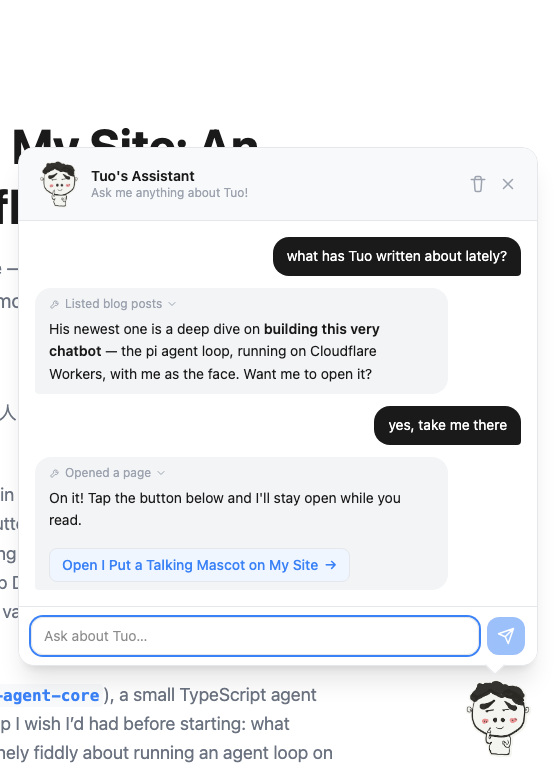
The result is a chatbot that answers questions about me, grounded in my actual CV, blog posts, and project list; that can offer to take you somewhere on the site with a one-click button; and whose face visibly changes mood as the underlying agent thinks, calls tools, and types. The whole thing runs on Cloudflare Workers and D1 — no separate backend, no GPU, no Python service. The model is a cheap DeepSeek model behind OpenRouter (the default is OpenRouter’s ~deepseek/deepseek-flash-latest alias, so it automatically follows the latest DeepSeek Flash release; it is still swappable with one env var), so at my traffic the cost is pennies — rounding-error territory.
I built it on pi (@earendil-works/pi-ai + @earendil-works/pi-agent-core), a small TypeScript agent harness, specifically because I wanted to learn it. This is the write-up I wish I’d had before starting: what worked, what nearly didn’t, and the handful of things that are genuinely fiddly about running an agent loop on the edge.
Why an agent, and why pi
The naive version of “chatbot about me” is: stuff my bio into a system prompt and call an LLM. That works until someone asks “what’s the third project on your side-projects page?” or “summarize your most recent post” — questions whose answers live in my content, not in a frozen prompt. The moment you want grounded, up-to-date answers, you want tools, and the moment you have tools you want an agent loop: call the model, let it ask for a tool, run the tool, feed the result back, repeat until it’s ready to answer.
I didn’t want to hand-roll that loop. pi is a three-layer monorepo, and I only needed the bottom two:
@earendil-works/pi-ai— a unified, multi-provider LLM API. It has a built-in OpenRouter provider and only registers models that support tool calling, so the old “does this model even support function calling?” anxiety just goes away.@earendil-works/pi-agent-core— the agent loop itself: send → tool-call → execute → repeat, with hooks for steering and budgets. Crucially, it ships zero concrete tools. A tool is just an interface —{ name, description, parameters, execute() }— and you bring your own. That matched my use case exactly.
The third layer (pi-coding-agent, the CLI) leans on fs, child_process, and a terminal UI — none of which exist on Workers — so I left it alone. The split is deliberate: the loop is portable; the coding-specific bits are not.
The one real risk: does an agent framework even run on workerd?
Cloudflare Workers don’t run Node. They run workerd, a V8-based runtime with no filesystem, no child_process, and — the sharp edge here — restrictions on dynamic code evaluation. eval and new Function() throw. That last one matters because the classic JSON-Schema validators (looking at you, ajv) compile schemas into functions at runtime with new Function(). Drop one of those into a Worker and your first tool call explodes.
So before I wrote a single line of UI, I stood up a throwaway Worker route that just called pi-ai through wrangler dev and forced a tool-call validation. It worked. Two reasons it works on current pi:
pi-agent-core’s main entry is free ofnode:built-ins — they’re quarantined behind a./nodesubpath you simply don’t import.- Recent
pi-aivalidates tool arguments with TypeBox (typebox/compile+typebox/value), notajv. TypeBox is the eval-restricted-friendly path. Theajvdependency that used to require a stub on Workers is gone.
All it took on my side was compatibility_flags = ["nodejs_compat"]. No ajv alias stub, no polyfills. If you’re doing this on an older @mariozechner/*-scoped build of pi you may still need the stub — but on the current @earendil-works/* packages, I didn’t.
The lesson worth generalizing: when you’re putting an unfamiliar dependency on an unusual runtime, verify the single riskiest assumption first, in isolation, before you’ve built anything that depends on it being true. Twenty minutes with wrangler dev saved me from designing a whole UI around a backend that might not boot.
The shape of the thing
Floating mascot (React island, on every page)
   │  POST /api/chatbot/message   { messages, page, conversationId }
   ▼
Hono route on Cloudflare Workers
   ├─ verify the Better Auth session (this endpoint spends money)
   ├─ rate-limit per user in D1 (atomic)
   ├─ run the pi Agent loop with 7 read-only tools
   │     └─ OPENROUTER_API_KEY never leaves the server
   ├─ stream tokens + tool events + nav actions back as SSE
   └─ log the exchange to D1 (fire-and-forget)
The single hard rule: the LLM call happens server-side, in the Worker. The browser only ever talks to /api/chatbot/*. The OpenRouter key lives in a Worker secret and never reaches the client. Everything else is detail — but the details are where it got interesting.
Tools, and the content-collections gotcha
The agent has seven read-only tools: read_cv, list_blog_posts, read_blog_post, list_side_projects, read_page, browse_site, and open_page. Six are pure server-side reads; the seventh (open_page) is the navigation trick I’ll get to.
A tool in pi is delightfully plain. Here’s the CV reader in full:
{
  name: "read_cv",
  label: "Read CV",
  description:
    "Fetch Tuo Lei's CV / resume (markdown). Use for questions about his work history, skills, education, or experience.",
  parameters: Type.Object({}),
  execute: async () => {
    const cv = await getCv(); // cached GitHub Raw fetch, 10-min TTL
    const text = `Tuo's CV page is at /cv (link it as [CV](/cv)).\n\n${truncate(cv, 6000)}`;
    return { content: [{ type: "text", text }] };
  },
}
The CV is just a fetch() of a GitHub README, cached in module scope so the fetch isn’t repeated on every call within a Worker isolate. (Worth being precise about what that cache is: it’s per-isolate, not a global cache — it lives as long as that isolate stays warm, up to a 10-minute TTL, and a cold start simply re-fetches. For a CV that changes a few times a year, that’s exactly the right amount of caching.) Easy.
The blog tools were not easy, and the reason is a genuine Astro gotcha worth flagging. My posts are Astro content collections (src/content/notes/*.md), and the idiomatic way to read them is getCollection(). But getCollection() is a build-time-only API. My Hono Worker is a standalone runtime bundle — it can’t call it. The post you’re reading right now is invisible to that function at request time.
I considered the obvious workaround — a committed posts.json manifest, regenerated by a script — and rejected it, because “remember to run the generator” is exactly the kind of step I forget. Instead I lean on Vite, which already bundles the Worker:
const noteFiles = import.meta.glob("/src/content/notes/*.md", {
  query: "?raw",
  import: "default",
  eager: true,
}) as Record<string, string>;
import.meta.glob with ?raw inlines the raw markdown of every post directly into the Worker bundle at build time. I parse the frontmatter with a tiny hand-rolled parser, drop drafts, and sort by date — all at module load. The upshot: whatever posts exist when I deploy are reflected automatically. No manifest, no generator, no forgotten step. Adding a markdown file is the deploy.
I do the same trick for the static pages, globbing /src/pages/**/*.astro (with a negative pattern that keeps admin, draw, login, and shared templates out of the bundle entirely — not just filtered at runtime, but never shipped). That gives the agent both a sitemap (browse_site) and the readable prose of each page (read_page), derived from the filesystem so it can never drift from reality.
Every tool truncates its output. The model is small and cheap; dumping a 20KB post into context is both wasteful and counterproductive. Concise tool results, every time.
Streaming without a streaming library
I wanted tokens to appear live, and I wanted the mascot to react while the agent worked — not just at the end. That means streaming, and on Workers the natural primitive is a ReadableStream emitting Server-Sent Events. I defined a tiny five-event protocol:
event: delta   → { text }          incremental assistant text
event: tool    → { name }          a tool started (drives the "working" mood)
event: action  → { type, path, … } a navigation button to render
event: done    → {}                turn finished
event: error   → { error }         turn failed
The Worker subscribes to the pi Agent’s event bus and forwards what matters:
agent.subscribe((event) => {
  if (event.type === "message_update") {
    const e = event.assistantMessageEvent;
    if (e.type === "text_delta" && e.delta) send("delta", { text: e.delta });
  } else if (event.type === "tool_execution_start") {
    send("tool", { name: event.toolName });
  }
});
On the client there’s no EventSource — I’m POSTing a body, so I read the fetch response stream by hand, split on \n\n, and dispatch. It’s about forty lines and it means I depend on nothing but the platform. The tool events are the secret sauce for the UI, which brings me to the actual point of this whole project.
The mascot is the UI
The brief had one hard requirement that wasn’t really technical: the mascot has to feel alive. The existing CharacterAvatar component already had 19 moods (thinking, working, happy, wow, cry, …) as hand-drawn PNGs. I wired the request lifecycle to a small state machine and mapped each phase to a mood:
type Phase = "idle" | "listening" | "thinking" | "working" | "talking" | "error" | "tired";

const PHASE_MOOD: Record<Phase, CharacterMood> = {
  idle: "greeting",
  listening: "listening",   // you're typing
  thinking: "thinking",     // waiting on the model
  working: "working",       // a tool is running
  talking: "happy",         // tokens are streaming in
  error: "cry",
  tired: "sad",             // you hit the rate limit
};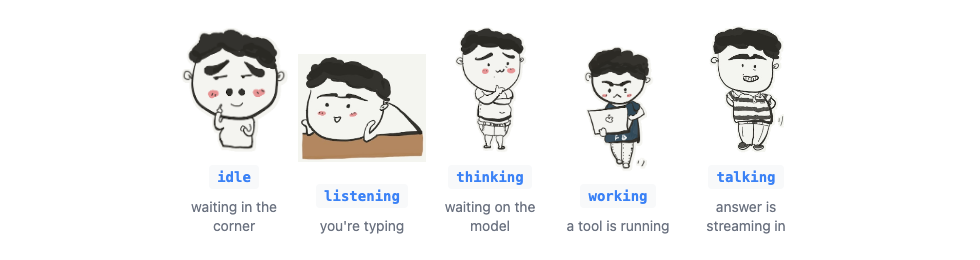
Because the SSE stream tells the client exactly when a tool starts and when text begins flowing, the mascot’s face is a real-time readout of the agent loop. Ask it something simple and it just thinks, then talks. Ask “summarize your latest post” and you watch it flip to working while read_blog_post runs, then to happy as the summary streams out. The “what is it doing right now” question that usually requires a debug panel is, here, answered by a cartoon’s facial expression. That’s the whole charm, and it cost almost nothing — the moods already existed; I just had to drive them from the right events.
Letting the agent navigate (without hijacking the browser)
The cutest tool is open_page. When you’d plausibly want to go somewhere — “take me to your contact page”, “show me that post” — the model calls it, and the Worker streams an action event back. The client renders an “Open … →” button under the reply. The agent never moves you on its own; you click. The tool’s own result text even reminds the model of this: “In one short sentence, invite the visitor to click it — do NOT claim you’ve already taken them there.”
It’s validated server-side, too — open_page only accepts a path that actually exists in the route map or is a real post slug, so the model can’t fabricate a /resume that 404s. (The system prompt hammers this from the other side: only link paths returned by tools, never guess a URL.) For deep links into a post, read_blog_post returns each section’s heading plus a slugified anchor id, and the button can scroll-and-flash straight to that section.
Persisting across a full page reload
Here’s a constraint that’s easy to forget on a multi-page Astro site: every internal link is a full page reload. Click from /about to /notes and the React island — chat history and all — gets torn down and recreated. A chatbot that resets every time you navigate is useless.
The fix is sessionStorage. The widget serializes its conversation (messages, phase, the active conversation id) on every change and rehydrates on mount. sessionStorage rather than localStorage is deliberate: tab-scoped is the right lifetime for a transient site chat — it survives navigation but clears when you close the tab. So you can be reading a post, ask the mascot to take you to another post, click its button, land on the new page mid-reload, and the conversation is right there waiting.
There’s also an opener system layered on top: hover any internal link (any <a> pointing at another page on the site, or anything tagged data-talk) and the mascot shows a one-line preview bubble for that destination; click it and the chat opens pre-seeded with a canned question-and-answer for that page, so the real model picks up from a warm, on-topic starting point instead of a blank box. Small touch, big difference in how inviting it feels.
Spending real money safely
This endpoint is open to any signed-in GitHub user and it spends OpenRouter credits on every call, so the guardrails aren’t optional. Layered, worst-case-bounding:
maxTokens: 4000on every LLM call, injected via pi’sstreamFnhook.MAX_TOOL_CALLS = 8— pi’sbeforeToolCallhook blocks further tools once spent and forces the model to answer with what it has.- A 30-second hard wall-clock cap — a stuck provider can’t pin a Worker or run up a bill;
agent.abort()fires on the timeout. - Input budgets — a single message is capped, and replayed history plus the new turn is capped together, so a one-word prompt can’t drag 20 turns of priors back into the model.
- A per-user rate limit in D1 — 100 messages per 8-hour fixed window, admins exempt.
That last one is the only genuinely subtle piece, because rate limiting under concurrency is a classic footgun. I do it in two atomic D1 statements. First, an upsert that resets the window if it’s expired:
INSERT INTO chat_usage (user_id, count, window_started_at, updated_at)
VALUES (?1, 0, ?2, ?2)
ON CONFLICT(user_id) DO UPDATE SET
  count = CASE WHEN ?2 - window_started_at >= ?3 THEN 0 ELSE count END,
  window_started_at = CASE WHEN ?2 - window_started_at >= ?3 THEN ?2 ELSE window_started_at END,
  updated_at = ?2;
Then a conditional increment that only bumps the count while it’s under the cap:
UPDATE chat_usage SET count = count + 1
WHERE user_id = ?1 AND count < ?3
RETURNING count;
Because the count < cap check and the increment are a single atomic statement, two simultaneous requests from the same user can race all they like and the count can never overshoot the cap. If the UPDATE returns no row, you’re over the limit — and that’s when the mascot flips to its tired mood and says it needs a rest. The guardrail even has a personality.
Every exchange is also logged to a chat_message table — fire-and-forget via executionCtx.waitUntil, so logging never blocks or breaks the visitor’s reply — with an admin-only viewer so I can see what people actually ask. (Spoiler: mostly “are you real?”)
What I’d tell someone starting this
A few things generalized beyond my little site:
- An agent framework on the edge is viable today, but the runtime is the risk, not the framework. Verify dynamic-eval /
node:assumptions in a five-minute spike before you build on them. - Tools are an interface, not a feature you import. pi shipping no built-in tools felt like a gap for ten minutes and then felt correct: my tools are seven small functions over my own content, and they’re the entire reason the answers are trustworthy.
- Ground everything in the filesystem at build time.
import.meta.glob('…', { query: '?raw' })turned “keep the bot’s knowledge in sync with the site” from a chore into a non-event. - Stream tool events, not just tokens. The single most-loved part of this — the mascot reacting in real time — falls out for free once the client knows when a tool starts.
- Bound the worst case in layers. Per-call tokens, per-turn tool budget, wall-clock cap, input budget, and a per-user window each catch a different failure mode.
The mascot’s been talking for a couple of weeks now. It still can’t tell you what time I go to sleep — I made sure of that — but it’ll happily walk you through everything else. It’s live on this very page: sign in with GitHub, then poke the little character in the corner and ask it something. Bonus: this whole site was built almost entirely by talking to Claude Code, so the mascot is, fittingly, an AI explaining a site that an AI built.